

No Crop Insta Size Fit CropNil
Fit your whole photo or video to Instagram size — no cropping required
Screenshots



About CropNil
CropNil solves one of Instagram’s oldest annoyances: the crop. Instead of losing the edges of a great shot to a square or story ratio, CropNil fits your entire photo or video onto a canvas that matches the platform’s size — then fills the space around it with a blur, pattern, gradient or color that makes the whole post look intentional.
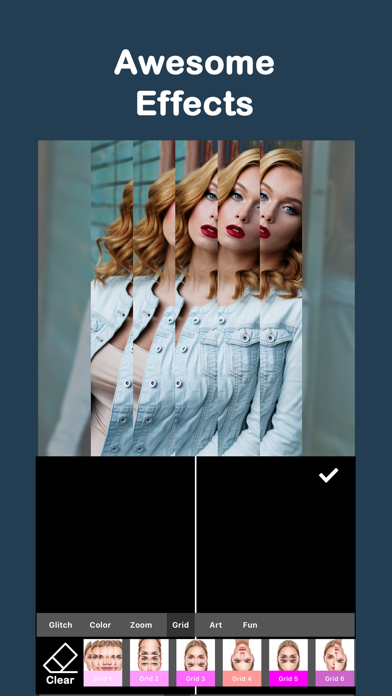
It’s more than a resizer. Handpicked filters — over 120 of them — plus photo and video effects, frames adjusted to your content, image stickers and text with custom fonts, colors and borders let you finish the post in the same app. Working on a reel? Add music and sound effects to jazz up your video before you export.
Whether you post to Instagram, stories or any other social platform, CropNil supports all the famous ratios, so your full picture always makes it into the frame. Download it free and stop cropping the good parts out.
Key features
Every social media size
Choose from the height and width ratios of all famous social platforms so your full photo or video always fits the post.
Custom backgrounds
Fill the space around your picture with blur, patterns, gradients or solid colors that complement the shot.
120+ filters and effects
Polish photos and videos with handpicked filters, photo and video effects, and beautiful frames sized to your content.
Stickers, text and music
Add image stickers and text with custom fonts, colors and borders — and jazz up videos with music and sound effects.
How to use CropNil
Download CropNil from the App Store
CropNil is free to download and works on iPhone and iPad running iOS 11.3 or later.
Pick a photo or video
Choose the picture or clip you want to post from your camera roll.
Choose a size and background
Select the ratio for an Instagram post, story or any other platform, then style the empty space with blur, a pattern, a gradient or a color.
Style, save and share
Add filters, frames, stickers or text if you like, then export your no-crop post ready to upload.
Frequently asked questions
How does CropNil fit my full photo on Instagram without cropping?
Instead of cutting your picture down to Instagram's ratio, CropNil places the whole photo on a canvas that already matches the required size. The remaining space is filled with a background of your choice — blur, pattern, gradient or color — so nothing gets cut off.
Is CropNil free to use?
CropNil is free to download from the App Store and you can create no-crop posts right away. Some premium features may be offered inside the app, such as unlocking all backgrounds, frames, filters and effects and removing ads and the watermark.
Does CropNil work with videos too?
Yes. CropNil creates no-crop videos as well as photos, and you can add music and sound effects to your clips — handy when you're preparing reels or stories.
What backgrounds and frames can I use?
You can fill the space around your photo or video with blur, patterns, gradients or solid colors. There are also beautiful frames — image, pattern, gradient or color — automatically adjusted to the size of your content.
Can I use CropNil for platforms other than Instagram?
Yes. CropNil supports the height and width ratios of all famous social media platforms, so the same photo can be sized for a post, a story or any other network you use.
Which devices does CropNil support?
CropNil runs on iPhone and iPad running iOS 11.3 or later. An Android version is planned — check back on this page for the Google Play link.
Get CropNil today
Free to download — join the users who already love it.